

How to Write Prompts for Claude Sonnet 4.6 (Updated Techniques)
Claude Sonnet 4.6 follows instructions more precisely than previous models, which means your old prompts may need updating. Techniques that worked for Sonnet 4.5 — heavy repetition, aggressive guardrails, all-caps emphasis — can now cause problems like overtriggering and rigid outputs.
The best prompts for Sonnet 4.6 are shorter, cleaner, and more direct.
This isn’t a beginner’s guide to prompting. If you already use Claude and want your prompts to work better with the new model, this is the update you need. We’ll cover what changed, what to stop doing, and how to use Sonnet 4.6’s new features — including adaptive thinking and effort levels — to get better results with less work.
What Changed About Prompting in Sonnet 4.6?
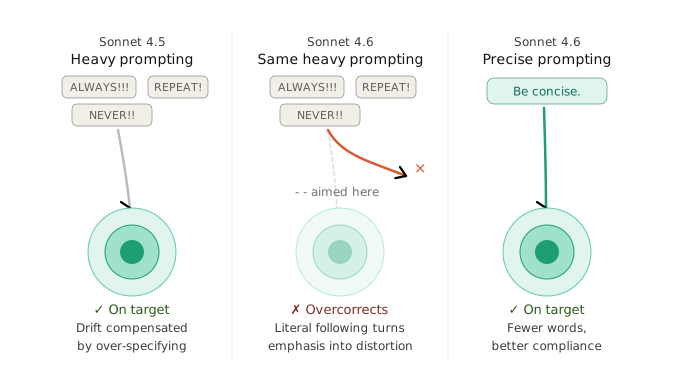
Claude Sonnet 4.6 was trained for tighter instruction following than any previous Sonnet model. That sounds like pure upside, but it changes the prompting dynamic in ways that can trip you up if you don’t adjust.
The core shift: Sonnet 4.6 does what you say more literally. With Sonnet 4.5, experienced users learned to over-specify — repeating constraints, adding redundant safety rails, shouting instructions in all-caps. That was a workaround for a model that sometimes drifted. Sonnet 4.6 doesn’t drift the same way, so those workarounds now cause overcorrection.
Three specific changes matter:
Instruction sensitivity is higher. Where you might have said “CRITICAL: You MUST use this tool when…” you should now say “Use this tool when…” Anthropic’s own migration guide confirms that aggressive prompting language causes overtriggering in 4.6 models. The model is more responsive to your system prompt — which means it’s also more responsive to bad habits baked into your system prompt.
The model reads context before acting. In Claude Code testing, users reported that Sonnet 4.6 reads surrounding context before modifying code, rather than jumping straight into changes. This carries over to general prompting — the model is better at understanding what you mean from context, so you don’t need to spell out every implication.
Suggestions vs. actions are taken literally. If you say “can you suggest some changes,” Sonnet 4.6 may give you suggestions instead of making changes. Previous models sometimes guessed your intent. This one takes you at your word. Say “make these changes” if you want changes made.
Stop Over-Specifying Your Prompts
The most common mistake power users make with Sonnet 4.6 is prompting it the way they prompted Sonnet 4.5. Prompts that were built as workarounds for a less obedient model now create problems with a more obedient one.
Here’s what to cut:
| Old Habit (Sonnet 4.5) | Updated Approach (Sonnet 4.6) |
|---|---|
| “CRITICAL: You MUST always…” | “Use this when…” |
| Repeating the same constraint 3 times | State it once, clearly |
| All-caps emphasis on instructions | Normal casing — the model reads it fine |
| “If in doubt, use [tool]” | Remove — causes overtriggering |
| “Don’t forget to…” reminders | Remove — the model follows the first instruction |
| Over-prompting for thoroughness | Let the model be thorough by default, dial up with effort |
The pattern is simple: if you added something to your prompt because an older Claude model kept ignoring it, test removing it with Sonnet 4.6. There’s a decent chance the workaround is now making things worse.
One specific tip from Anthropic’s docs: if you previously encouraged Claude to be more thorough or aggressive with tool use, dial that language back. Sonnet 4.6 is more proactive by default. Instructions that fixed undertriggering in older models now cause overtriggering.
How to Use Adaptive Thinking and Effort Levels
Sonnet 4.6 introduces the effort parameter to the Sonnet family for the first time. This gives you a speed-accuracy dial that didn’t exist before — and it changes how you should structure prompts for different tasks.
Adaptive thinking means the model decides how deeply to reason based on the complexity of your request. Instead of manually setting a thinking token budget, you set an effort level and let the model allocate its reasoning accordingly.
The four effort levels work like this:
Low effort: The model skips extended thinking for most tasks. Best for simple queries, quick lookups, or when speed matters more than depth. Expect similar performance to Sonnet 4.5 without thinking — but often better because the base model improved.
Medium effort: Anthropic recommends this as the sweet spot for most Sonnet 4.6 use cases. The model thinks when it’s worth thinking and skips when it’s not. Good balance of speed, cost, and quality.
High effort (default): The model almost always thinks. This is what you get if you don’t set the parameter at all. Strong performance, but higher latency and token cost.
Max effort: Only available on Opus 4.6. Sonnet 4.6 caps at high.
The practical takeaway: you don’t need to cram reasoning instructions into your prompt anymore. Instead of writing “think through this step by step before answering,” set the effort level to high and let the model handle it. The adaptive thinking system is better at allocating reasoning tokens than you are at guessing how many to request.
For API users, this looks like setting output_config: {"effort": "medium"} in your request. In Claude Code, use the /effort command or set it via environment variable.
Write Shorter, Cleaner System Prompts
Sonnet 4.6 is more responsive to system prompts than previous Sonnet models. That responsiveness cuts both ways — a well-written system prompt works better, but a bloated one causes more problems.
Good system prompts for Sonnet 4.6 follow a tight structure: define the role, set constraints, specify the output format, and stop. You don’t need motivational preambles, repetitive warnings, or paragraphs of context that could be inferred.
Here’s the difference in practice:
Bloated (old style):
You are a senior software engineer. This is EXTREMELY IMPORTANT.
You MUST always write clean, well-documented code. NEVER forget
to add comments. I repeat: ALWAYS add comments to your code.
Make sure you consider edge cases. Don't forget about error
handling. Remember to be thorough. Think step by step before
writing any code. Double-check your work.
Clean (Sonnet 4.6 style):
You are a senior software engineer. Write clean, documented code
with comments, edge case handling, and error handling.
Same result. A fraction of the tokens. The second prompt works better with Sonnet 4.6 because the model isn’t fighting through noise to find the actual instructions.
One more thing: if you’re giving Claude a role through a system prompt, be specific about the role but light on behavioral instructions. Sonnet 4.6 infers appropriate behavior from the role itself. Telling it to “act like an expert” and then also telling it to “be thorough” and “consider multiple angles” is redundant — an expert already does those things.
Prompting for the 1M Token Context Window
Sonnet 4.6’s 1M token context window (in beta) changes how you structure prompts for large inputs. With 200K tokens, you had to be selective about what to include. With 1M, you can include everything and let the model find what’s relevant.
But bigger context doesn’t mean you can be lazy about prompt structure. In fact, clear instructions matter more with large contexts because there’s more content for the model to sort through.
Two rules for long-context prompting:
Put your instructions at the beginning and end, not buried in the middle. Models pay more attention to the start and end of input. If you’re loading 500K tokens of documents and then asking a question, put your question (or at least a summary of what you need) at the top as well as the bottom.
Be specific about what you’re looking for. “Summarize this” is vague when “this” is 750,000 words. Instead: “Find every mention of Q3 revenue projections across these documents and compile them into a single table with the source document, the figure, and the date.”
Sonnet 4.6’s long-context retrieval improved from 18% to 76% compared to Sonnet 4.5. It’s much better at finding needles in haystacks. But it finds them faster when you describe the needle.
Frequently Asked Questions
Do my old Claude prompts still work with Sonnet 4.6?
Most prompts work without changes. But if your prompts include aggressive language (“CRITICAL,” “MUST,” all-caps emphasis), repetitive constraints, or tool-forcing instructions, they may overtrigger or produce overly rigid outputs. Test and simplify.
What effort level should I use for Sonnet 4.6?
Anthropic recommends medium for most Sonnet 4.6 use cases. Medium balances speed, cost, and quality. Use high for complex reasoning tasks. Low works for quick, simple queries where speed matters most.
Do I still need chain-of-thought prompting with Sonnet 4.6?
Less than before. Adaptive thinking handles reasoning allocation automatically. For complex tasks, set effort to high instead of writing “think step by step.” You can still add chain-of-thought instructions for very specific reasoning patterns, but the model does this well on its own now.
How do I prompt Claude Sonnet 4.6 for coding tasks?
Be direct about what you want: “Make these changes” not “Can you suggest changes.” Specify the language, framework, and output format. Skip anti-laziness instructions — Sonnet 4.6 is rated as less lazy and less prone to over-engineering than Sonnet 4.5 in user testing.
What’s the best system prompt length for Sonnet 4.6?
Shorter than what you used for Sonnet 4.5. State the role, constraints, and output format. Remove repeated instructions, all-caps emphasis, and behavioral coaching. Sonnet 4.6 infers more from less. A clean 50-word system prompt outperforms a noisy 300-word one.
The prompting game changed a little with Sonnet 4.6. Not the fundamentals — clear instructions, specific constraints, and good examples still win. But the model is now good enough at following instructions that the workarounds you built for older models are getting in the way.
Strip your prompts down. State things once. Use the effort parameter instead of reasoning instructions. Let the model do its job.
The best prompt for Sonnet 4.6 is the shortest one that gets the output you need. Start there and only add complexity when the results demand it.